Add-in for Autodesk Fusion
Fair splines that stay inside your limits.
FuzzyOptimaCAD smooths bumpy sketch splines in Autodesk Fusion. You set the limits (deviation, minimum radius, inflections, symmetry). The add-in checks every one on Fusion's own spline and tells you plainly if one is not met.
Get a free trial key See how it works
Free: 20 optimizations, valid 14 days. No account, no payment details. Needs an internet connection.
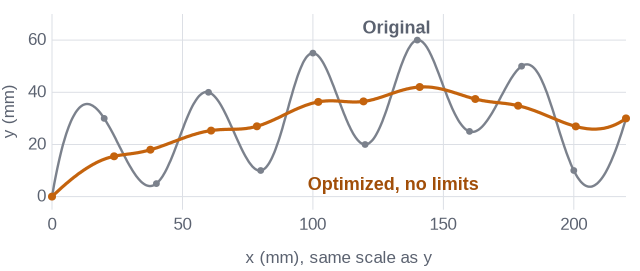
- 1.9 → 19.1 mmminimum radius of curvature
- 602 → 2.3fairness (curvature variation)
- 9 → 5inflections
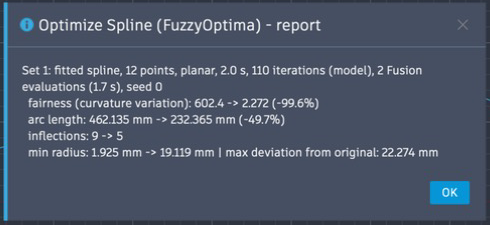
Report of a real run in Fusion on this spline, with no limits set (so the curve moved up to 22.3 mm). With a 5 mm deviation limit the same spline gives different numbers; both runs are shown below.
The problem: a curve that looks fine but is not fair
A fit point spline drawn by hand or imported from a scan, a DXF or a tracing passes exactly through your points, and that is the trouble: every point error becomes a wiggle. The curve can carry curvature spikes and extra inflections that are hard to see on screen but show up later.
- Surface quality. Wobble in a profile curve can appear as broken reflection lines or zebra stripes on a surface built from it.
- Offsets and lofts. A tight local radius can make an offset collapse or fail, and uneven curvature carries into lofts.
- Machining. Abrupt curvature changes along a toolpath demand abrupt changes in feed and acceleration, which can leave marks or invite chatter.
- Flow and stress. Curvature concentrations on a boundary can matter for airflow, fluid flow and local stress.
The usual fix is to nudge points by hand and look again. That is trial and error: you can make the curve smoother and quietly move it out of tolerance, and nothing tells you either way.
The promise: smoother and inside your limits
The add-in moves the existing points of your spline to make its curvature even. Limits you switch on are hard constraints, and they are verified on the real Fusion spline, not on an internal model. Here are two real runs on the same 12-point spline (add-in v0.1.0, macOS), taken from our test log.
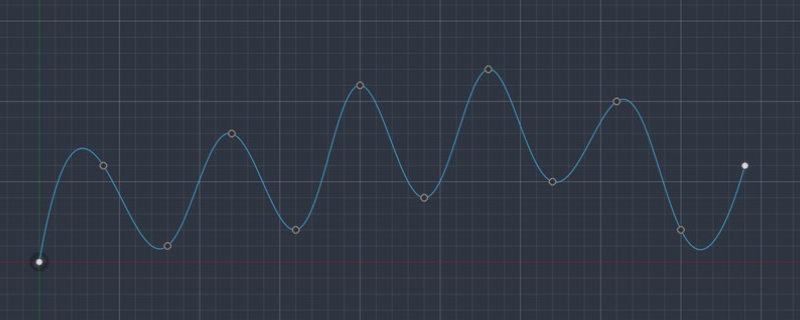
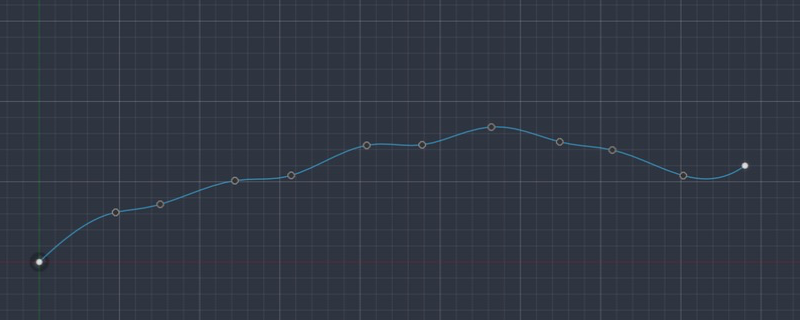
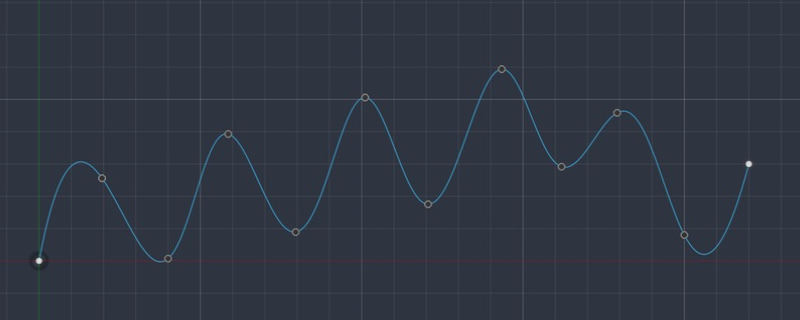
| Quantity | Original | No limits | Max deviation 5 mm |
|---|---|---|---|
| Fairness (curvature variation, lower is smoother) | 602.4 | 2.272 | 495.1 (−17.8%) |
| Arc length | 462.135 mm | 232.365 mm | 446.073 mm |
| Inflections | 9 | 5 | 9 |
| Minimum radius | 1.925 mm | 19.119 mm | 2.052 mm |
| Max deviation from original | 0 | 22.274 mm | 4.793 mm (limit 5.00 mm: met) |
The honest reading: the limit run is only mildly smoother (fairness −17.8%) because it may not move the curve much. That is the trade-off you control. The report line for the limit run:
max deviation: limit 5.00 mm | value 4.793 mm -> metCurvature before and after
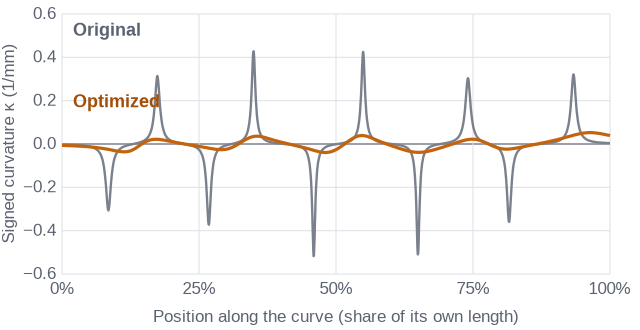
Curvature is what reflection lines and tool motion respond to. Same spline, no limits:
What you control
| Control | What it guarantees | Notes |
|---|---|---|
| Max deviation | The curve stays within your value of the original, in both directions. | Ranks above the other limits when they conflict. |
| Min radius | The radius of curvature is nowhere below your value, for example for a tool. | |
| Max inflections | No more than your number of points where the bend changes direction. | |
| Symmetry | About the sketch Y axis, the sketch X axis or the first-last point bisector. A symmetric input gives an exactly symmetric result. | Highest priority. If the input is not symmetric it is skipped and the report says so. |
| End tangents | Lock the directions at the ends of the curve as they are. | For chains, joints keep their position, and their tangent where it already matched. |
| Chains | Select connected curves (for example spline, arc, spline). Splines are faired; lines and arcs stay untouched as fixed boundaries. | Branched chains are not supported. |
| Control point splines | Faired by moving control points. | Skipped if the control frame is off, or the spline is periodic or rational with unequal weights. Not yet verified in a live Fusion session. |
| Weights and seed | Balance smoothness, tension and closeness to the original; the same seed gives the same result. | Not hard limits. |
| Not supported | Closed splines, splines with fewer than 3 points, Fusion's tangent and curvature handles. | See the limitations. |
If limits conflict, priority is: symmetry, max deviation, min radius, max inflections. A limit your input already met is not violated by the result.
How it works
1 Select the spline and set limits
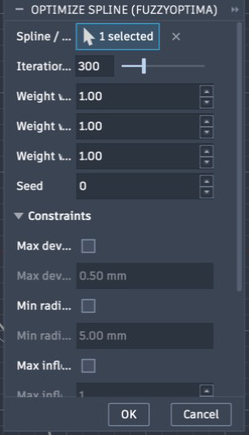
Click Optimize Spline (Sketch tab, Modify panel), pick the curve, and switch on the limits you need. Leave everything else at its defaults.
The dialog. 2 Check the preview
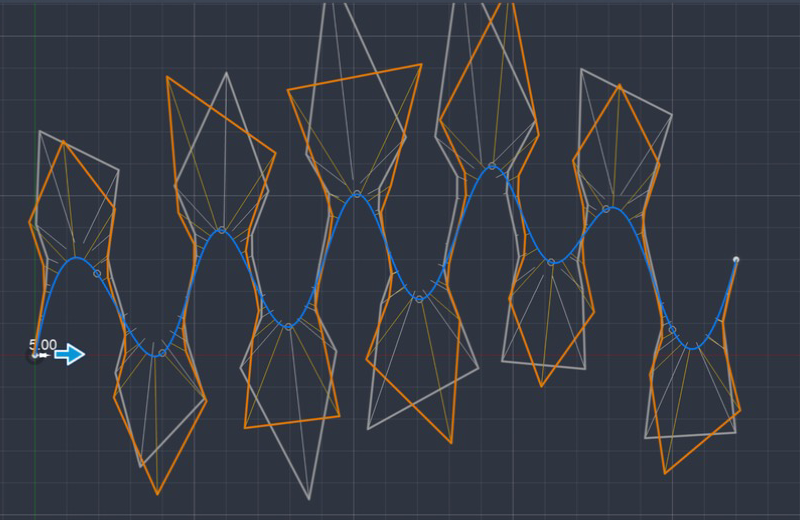
The viewport shows a curvature comb live: grey is your original, orange is the result. A spiky comb is a bumpy curve. Nothing is applied yet.
Preview with a 5 mm deviation limit. 3 Press OK and read the report
The result is applied as one action (Ctrl+Z undoes all of it) and a report lists every limit as met or NOT met, measured on the real spline. How to read the report.
The report after the no-limit run.
Each new input (a different curve or changed settings) counts as one optimization on your key, counted when its first result appears. Repeating the same input is free. Details.
Why you can trust the result
Preview before you apply
You see the curvature comb first. Cancel and your geometry is unchanged.
One undo step
OK is a single action in the history. Ctrl+Z restores the original.
Failure leaves your sketch alone
If the server cannot be reached or the calculation fails, the add-in says so and leaves your geometry unchanged.
Checked on real geometry
Limits are measured on Fusion's own spline after the points are moved, and the add-in corrects the result if the model and Fusion disagree.
It says NOT met
When a limit cannot be reached, the report says so instead of hiding it, and hints which deviation would be needed.
Never worse than the input
If nothing better than your curve is found, it reports "geometry unchanged".
What a missed limit looks like in the report (format illustration, not from the runs above):
max deviation: limit 5.00 mm | value 4.793 mm -> met
max inflections: limit 1 | value 3 -> NOT met
What leaves your computer: only a normalized curve shape (scaled and positioned relative to itself), your settings and the add-in version. No absolute coordinates, no units, no file, document or sketch names. The calculation runs on a server in the EU, the points are deleted when the session ends (within 15 minutes at most), and the result is converted back to your coordinates on your machine. Privacy policy.
Is this for you?
A good fit if
- You work in Autodesk Fusion with fit point splines (or control point splines) in sketches.
- You need smooth profiles but must stay within a tolerance, a minimum radius or symmetry.
- You can work online: the optimization runs in our cloud.
Not for you if
- You need it offline or air-gapped: there is no local mode.
- You use another CAD system: it is a Fusion add-in only.
- Your curves are closed splines, or branched chains of curves: these are not supported yet.
- You want a result without choosing limits: with none set, the curve may move a lot (22 mm in our example).
Good to know: larger splines take noticeably longer, because every candidate is measured on Fusion's geometry. Tested on macOS so far; Windows testing is still ahead. Fusion is a trademark of Autodesk, Inc.; this add-in is an independent product.
Questions engineers ask
Does it change my sketch in a risky way?
It moves the existing points of your spline and does not recreate it, so dimensions, constraints and features that reference the curve keep working. The whole run is one undo step. Lines and arcs are never changed. More.
Is my geometry uploaded?
A normalized shape (no absolute coordinates, units or names) is sent and held temporarily while the calculation runs, then deleted. Details in the FAQ and the privacy policy.
What counts as one of the 20 trial optimizations?
A new input (curve plus settings), counted when its first result appears. The same input again is free; a calculation that fails on our side is refunded to your key. Details.
Why does it need the internet?
The optimization engine runs on our server. The add-in on your computer handles the dialog and the sketch and measures the result on the real spline. Without a connection it tells you so and changes nothing.
What happens after the trial?
Paid plans are in development, with no date. You can join the Early Access waitlist to be told when they open.
Try it on your own spline
Get a trial key by e-mail (20 optimizations, 14 days), install the add-in, select a spline and look at the preview.
Get a free trial key Download the add-in
Paid plans are in development. Join the Early Access waitlist.